Finding the right wall-mounted laptop solution can free desk space, improve posture, and provide flexible viewing angles for work, gaming, or creative tasks. Below is a curated guide to five top options that balance full motion, load capacity, and ease of installation. Each product supports a range of laptop sizes and can double as a monitor mount, helping you tailor your setup to your workflow.
| Product | Brand | Size Range | Key Benefit |
|---|---|---|---|
| 2-in-1 Laptop Wall Mount with Detachable Tray | Putilsen Mount | 12-17″ laptops; 17-32″ screens | Premium adjustable arm with VESA compatibility |
| WALI Laptop Wall Mount, Full Motion | WALI | 10-17″ laptops; 17-32″ monitors | Extends and rotates for versatile angles |
| VIVO Pneumatic Extended Arm Laptop Wall Mount | VIVO | 10-15.6″ laptops | Counter-balance, smooth height adjust |
| PUTORSEN 2-in-1 Laptop Wall Mount | PUTORSEN | 10-17″ laptops; 17-40″ screens | Full motion with wide extension and anti-scratch tray |
| UPGRAVITY Laptop Wall Mount | UPGRAVITY | 12-17″ notebooks; 13-32″ screens | 2-in-1 wall mount with gas spring and cable management |
Note: The five selections below emphasize full motion, robust construction, and compatibility with common laptop and monitor sizes. They are well-suited for home offices, classrooms, and shared workspaces where desk real estate matters most.
2-in-1 Laptop Wall Mount With Detachable Tray

The Putilsen Mount unit supports 12-17 inch notebooks or 17-32 inch screens, with a platform width adjustable from 276 to 472 mm and a load capacity of 2-9 kg. It can serve as a fixed laptop station or convert into a monitor wall mount (VESA 75×75/100×100 mm). The arm rotation spans -90 to +90 degrees, and a 250 mm height range allows precise ergonomic alignment. Protective pads on all contact points prevent scratches while preserving device integrity. This mount prioritizes flexibility and security for daily use.
WALI Laptop Wall Mount, Full Motion Adjustable
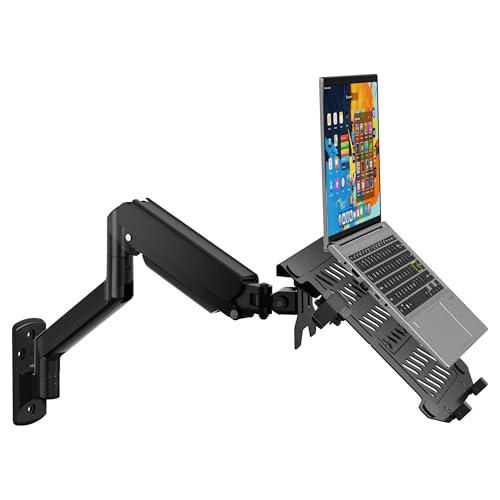
The WALI GSWM001LP model accommodates 10-17 inch laptops up to 15.4 pounds and 17-32 inch monitors up to 22 pounds, with mounting holes of 75×75 mm or 100×100 mm. It features a high-grade gas spring arm offering 16.7 to 19.3 inches of extension, a tilt range of +70 to -45 degrees, plus +/-90 degrees swivel and 360-degree rotation. The design emphasizes space saving while enabling a wide range of viewing angles for better posture and productivity.
VIVO Height Adjustable Pneumatic Extended Arm

This VIVO MOUNT-V001GL is a counter-balance wall mount designed for desktops and laptops up to 9.9 pounds, with a ventilated tray to aid cooling. It offers tool-less height adjustment, a +90° to -45° tilt, 180° swivel, 360° rotation, and a wide range of viewing angles. The ventilated tray features an adjustable clamp to fit multiple laptop sizes, while rubber tabs guard against scratches. The system emphasizes ergonomic positioning and airflow management for prolonged sessions.
PUTORSEN 2-in-1 Laptop Wall Mount
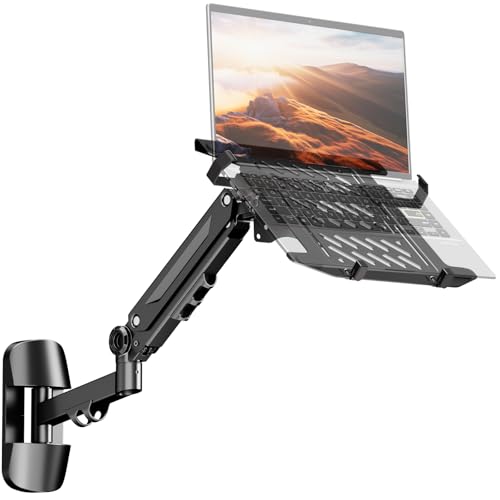
The PUTORSEN unit supports 10-17 inch laptops (up to 5 kg) and 17-40 inch monitors (up to 12 kg), with VESA 75×75/100×100 mm compatibility. It provides -90/+90° rotation, -45/+45° tilt, a 21.6-inch extension range, and a gas-spring arm for easy height adjustment. The construction uses reinforced steel with non-slip pads to prevent scratches, and the vented tray promotes laptop cooling. The design suits mixed setups requiring substantial reach and versatile positioning.
UPGRAVITY Laptop Wall Mount

The UPGRAVITY model is a 2-in-1 wall mount that fits 12-17 inch notebooks and 13-32 inch displays via a gas-spring, full-motion system. It offers an extended reach up to 19.7 inches and a maximum height of 16.34 inches, with tilt ±45 degrees, 180-degree swivel, and 360-degree rotation. A built-in cable management system keeps wires organized, while the ventilated design and sturdy build support ergonomic seating and standing setups. The mount aims to optimize space without compromising accessibility.
Buying Guide
Key considerations when choosing a laptop wall mount include compatibility, motion range, and weight support. Start by confirming the supported laptop size and weight to ensure a secure fit, especially if you frequently plug in external devices. Look for full-motion arms with tilt, swivel, and rotation to customize viewing angles for different tasks and users. Consider a monitor-laptop dual-use system if you require both displays in the same area, and verify VESA compatibility if you plan to attach a monitor rather than a laptop tray.
- Weight Capacity: Choose a model that comfortably supports your laptop’s weight, plus any accessories you might attach.
- Range Of Motion: A larger tilt and swivel range reduces glare and improves ergonomics for standing or seated work.
- Cable Management: Built-in channels help keep cords tidy, reducing tangling and electrical hazards.
- Ventilation: Ventilated trays prevent overheating, especially for laptops under load.
- Installation: Check for DIY-friendly installation with clear instructions and compatible mounting holes.
- Space-Saving Benefit: Measure wall space and assess how much desk real estate you’ll reclaim.
- Monitor Compatibility: If using both laptop and monitor, ensure your setup accommodates both with appropriate VESA patterns.
Durability and materials matter. Steel construction with anti-scratch pads protects devices during movement, while rubberized contact points reduce wear. For shared workspaces, prioritize models with easy height adjustments and stable clamps to minimize repositioning time. Finally, review warranty terms to protect against manufacturing defects and ensure long-term performance of the arm, tray, and mounting hardware.