Finding the right desk or stand for a 3D printer can boost efficiency, organization, and safety. The following selections focus on heavy duty construction, integrated filament storage, power hubs, and ample workspace. Each option is designed to keep printers level, materials accessible, and cords under control—helping you maintain a smooth 3D printing process across workshops, studios, and home offices.
Summary Table of Selected Products
- AHOWPD 3D Printer Table with Filament Storage – Black
- AHOWPD 3D Printer Table with Filament Storage – Brown
- MILEFA 3D Printer Table with Filament Storage – Double Workspace
- ARTINRACK 2025 Upgraded Dual 3D Printer Stand with Filament Storage
- Homieasy Printer Stand with Charging Station – 4-Tier Storage
AHOWPD Black 3D Printer Table With Filament Storage

AHOWPD’s Black 3D Printer Table combines a spacious top with integrated filament storage and a built-in power strip. The two AC outlets and two USB ports support multiple devices, keeping essential printers and peripherals powered in one centralized hub. A durable metal frame and double-tier filament racks help organize spools, accessories, and parts, reducing clutter and improving workflow in studios or workshops. The 140 cm power cord adds placement flexibility in tighter workspaces.
AHOWPD Brown 3D Printer Table With Filament Storage

This brown variant mirrors the black model’s multi-functional design, offering a spacious top surface, built-in power strip, and dual metal tube racks. It provides robust durability with a metal frame and two levels of filament storage, ensuring filament spools stay organized and accessible. The brown finish adds a warm, natural look to workshops and creative spaces while maintaining the same space-saving, productivity-boosting capability as its counterpart.
MILEFA Dual-Printer Table With Filament Storage
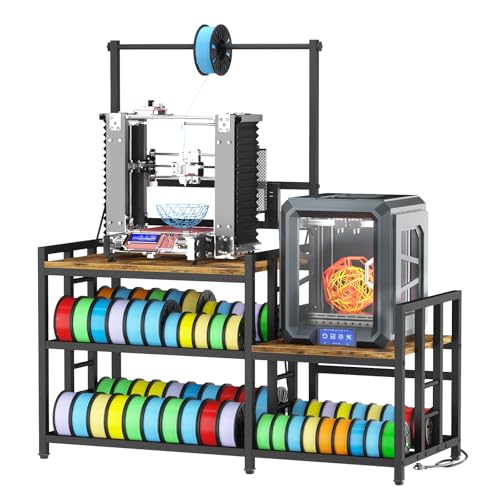
MILEFA’s heavy-duty stand offers two large work surfaces and a three-tier shelving system capable of storing up to 80 filament spools. The design supports two printers simultaneously, enhancing production capacity in workshops or studios. It also includes a built-in power hub that can run printers, drying chambers, and other devices without requiring multiple power strips. This model emphasizes space-saving efficiency and high output for demanding 3D printing environments.
ARTINRACK 2025 Upgraded Dual 3D Printer Stand

The TR44 upgraded dual-workstation design from ARTINRACK connects two tables side by side, creating a continuous surface ideal for collaborative projects or larger printers. A built-in power hub with six outlets and four USB ports helps manage multiple devices, reducing cable clutter. The expansive 47″W x 24″D surface accommodates printers, filaments, tools, and supplies, promoting a cleaner, more productive workspace.
Stilar 3D Printer Stand With Filament Storage

Stilar’s printer stand combines a sturdy 3D printer table, filtration-friendly drawers, and a power outlet in a single unit. With a weight rating up to 420 lbs, this cabinet-style stand minimizes wobble and supports heavy printers along with ample filament storage. The included drawers and cabinet space offer dust protection and organized storage for tools and accessories, making it a balanced choice for serious hobbyists and small shops alike.
HavenlyYouth 41-Inch Filament-Led Printer Stand

HavenlyYouth offers a large 41″ desk with filament storage and two charging stations embedded in the design. The stand accommodates a big printer on top while the lower shelves and spools racks handle extensive filament inventories. This model emphasizes all-in-one functionality with a high-capacity footprint suitable for larger setups in studios or maker spaces.
Homieasy Printer Stand With Charging Station

Homieasy combines a large top surface with a robust steel frame and multiple storage levels. The low-profile lower rack and upper shelves support at least two printers, while the integrated charging station ships with multiple USB ports and power outlets. It’s designed for busy environments where reliable storage and easy access to spools help maintain consistent 3D printing throughput.
Buying Guide: Key Purchase Considerations
- Printer compatibility and weight capacity: Check the maximum weight rating to ensure the stand supports your printer’s size and weight without wobble.
- Filament storage capacity: Consider how many spools you need to store and whether the design accommodates different spool sizes (200 g, 500 g, 1 kg).
- Power integration: Built-in outlets and USB ports simplify wiring. Ensure the power hub meets your device requirements and cord length fits your space.
- Workspace layout: Dual-workstation or single large surface options affect workflow. Decide if you need side-by-side printers for production or a single printer with a generous cleanup zone.
- Material and durability: Metal frames offer sturdiness and vibration resistance; engineered wood can provide a balance of weight and aesthetics for home offices.
- Mobility and placement: Wheels, if present, aid repositioning. For workshops, consider dust protection and drawer accessibility to protect filaments and tools.
- Assembly and maintenance: Look for straightforward assembly with clear instructions and accessible parts for ongoing upkeep.
- Expandability: Some models are designed to connect with additional units for a larger, modular system, useful in growing studios or schools.
In selecting a desk or stand for a 3D printer, prioritize a stable platform, integrated organization tools, and flexible power options. Users should balance top surface area with storage capacity and consider whether a single-drawer cabinet or a multi-shelf setup better suits their workflow. For teams, dual-workstation designs can significantly improve throughput, while hobbyists may prefer compact, modular layouts that fit smaller rooms.