Keeping cables under control helps improve safety, airflow, and productivity. This guide highlights top desk cable organizers that fit a range of desks and setups, with emphasis on no-drill or clamp installations, sturdy metal builds, and adjustable configurations. Explore five strong options that cover different thicknesses, weights, and decorating styles to help you pick the right fit for your home or office.
| Product | Brand | Key Benefit | Install Style |
|---|---|---|---|
| Mzmaxy Cable Management, 25” | Mzmaxy | Large 25″ tray with sturdy metal construction | No-drill clamp |
| Under Desk Cable Management Tray White | Cinati | Anti-scratch mats and versatile inward/outward mounting | No-damage clamp |
| Under Desk Cable Management Tray No Drill | Litwaro | 2-hole design and durable carbon steel | No-drill clamp |
| Univivi No Drill Under Desk Tray | Univivi | Large capacity with optional screw mounting | |
| Xpatee 2 Pack Cable Management Tray | Xpatee | Two-side openings for easy power strip access |
Note: This article compares five top picks for desk cable organization. Each product is described with its install method, capacity, and notable design features to help you balance aesthetics and function.
Mzmaxy 25” Cable Management Under Desk

The Mzmaxy 25″ cable management tray provides ample space to organize cables from a standing desk or a regular workstation. Its metal construction supports roughly 15 lbs of weight and accommodates desk thicknesses from 0.4″ to 2″ with built-in non-slip rubber pads that protect surfaces. The tray design supports inward or outward installation, allowing flexible positioning as your setup changes. The sturdy mesh layout promotes ventilation to prevent overheating and minimize dust buildup.
Cinati Under Desk Cable Management Tray White

The Cinati tray installs without drilling and uses a clamp system that attaches to desk frames. It includes anti-scratch mats to avoid desk surface damage and can be mounted inward or outward. Made from sturdy metal with a powder-coated finish, it holds up to 10 lbs and measures 13.4L x 4.6W x 3.1H. It fits desks between 0.4″ and 2.4″ thick, helping to neatly organize wires and power strips while keeping surfaces clean.
Litwaro Under Desk Cable Management Tray No Drill

The Litwaro tray emphasizes a no-drill approach with clamping that fits most desk frames. It features a carbon steel build for durability and a two-hole side design to allow cables to pass freely while offering inward or outward installation. The clamp includes anti-scratch padding to prevent desk damage, and the tray supports about 15 lbs. It is designed for desks ranging from 0.4″ to 2″ thick and is built to blend with modern office aesthetics.
INCHOR White Cable Clips and Organizers
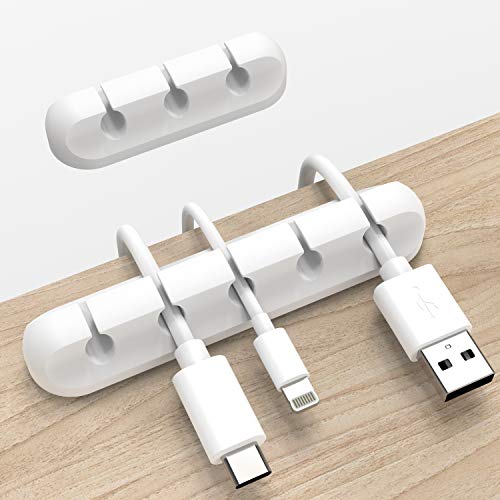
While primarily clips, this set from INCHOR offers adhesive cable clips that keep charging, USB, network, and power cords tidy on desks and walls. The product features 3M adhesive backing and flexible silicone material, enabling easy installation on smooth surfaces without drilling. Lightweight and easy to reposition, these clips work well for micro-cabling tasks, desk edges, and monitor setups alongside larger under-desk trays.
Univivi No Drill Under Desk Tray
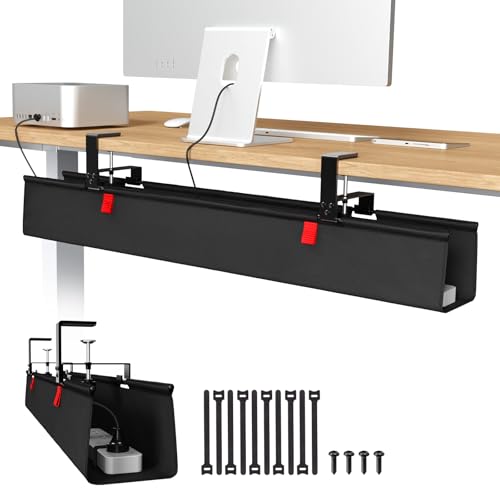
The Univivi tray offers a large capacity with dimensions listed to guide compatibility. It supports no-drill clamp mounting or screw fixing for greater versatility. The design is suitable for various desk types—wood, glass, or metal—and can be unfolded for easier cable insertion and removal. Built to accommodate power strips and adapters, it helps keep cables out of sight while protecting legs and feet from tripping hazards.
Fansto Under Desk Cable Management

Fansto offers a set focused on high capacity and modularity, including up to 15 cables per strap. The design is suitable for under-desk use with a flexible, narrow profile that fits tight spaces. The updated hook-and-loop fasteners provide a secure hold without slipping, and installation can be paired with adhesive hooks for additional flexibility. This option is ideal for growing setups with multiple devices and frequent reconfigurations.
Buying decisions for desk cable organization should consider several factors: installation method (no-drill vs. screw), desk thickness compatibility, weight capacity, and whether the tray supports inward or outward wiring. Aesthetics, ventilation, and ease of access for adding or removing cables are also key. For smaller spaces, consider lighter-weight clips or a low-profile tray; for larger desks with power strips and multiple devices, choose a wide tray with strong clamps and anti-scratch features. Durability and material quality (metal vs. plastic) affect longevity and dust resistance. Finally, verify that the product can accommodate the thickness and profile of your desk to ensure a secure, tidy setup.
Buying Guide: Key Purchase Considerations
- Install method: No-drill clamps are quick and desk-friendly, while screw-fixed trays offer maximum rigidity for heavier setups.
- Desk compatibility: Check thickness and edge design to ensure clamps grip securely without damage.
- Capacity and layout: Choose a tray that fits your number of cables, power strips, and adapters; two-side openings can simplify cable routing.
- Material and finish: Metal trays tend to be sturdier and better at ventilation; powder-coated finishes resist rust and wear.
- Surface protection: Anti-scratch padding or mats prevent desk damage during installation and use.
- Future-proofing: If you anticipate more devices, opt for a larger tray or modular components that can be expanded.
- Accessibility: Look for designs that allow easy access when adding or removing cables, minimizing the need to unplug devices.
- Maintenance: Consider ease of cleaning and how dust might accumulate in mesh trays or between cables.