Cluttered cables can hinder productivity and create safety hazards at home or in the office. The following five under-desk and cable-management products offer practical options to tidy wires, protect cords from pets or curious kids, and streamline your workstation. Each selection emphasizes easy installation, durable materials, and effective organization for a cleaner, more focused space.
| Product | Brand | Key Benefit |
|---|---|---|
| AGPTEK White Cable Sleeve Cover, 2 Pack 5ft | AGPTEK | Pets-friendly protection and easy sizing |
| EVEO Cable Management Under Desk Kit (6 Units) | EVEO | High-capacity, tool-free setup |
| Under Desk Cable Management Tray White, Cinati | Cinati | No-drill mounting, sturdy metal |
| No-Screw Under Desk Cable Management Tray, Scandinavian Hub | Scandinavian Hub | Adhesive-driven installation, sleek look |
| Univivi No Drill Under Desk Cable Management Tray | Univivi | Two installation methods, large capacity |
AGPTEK White Cable Sleeve Cover (2-Pack)

The AGPTEK cable sleeve offers a practical solution for grouping and concealing multiple cables along corners and under desks. Each sleeve is cuttable, allowing for custom lengths to fit tight spaces. With a diameter range of 0.75 to 1.2 inches, it accommodates a variety of cords—from power strips to data cables. The product emphasizes pet safety and child safety, using flame-retardant materials that resist temperatures between -50°C and +150°C and comply with flame protection standards (UL94 V-2). The sleeves can be cut with scissors and finished at the cut edge with a quick fire-tinish to prevent fraying. This helps keep chewing hazards away from curious pets while maintaining a cleaner workspace.
Ideal for homes with pets and kids, this option keeps cords protected and out of reach while providing a neat, streamlined appearance under the desk or along baseboards. The self-closing design reduces tangling and makes it easier to add or remove cables as setups evolve. For larger desk systems with multiple devices, these sleeves can be combined with other management solutions to create a cohesive cable ecosystem.
EVEO Cable Management Under Desk Kit (6 Units)
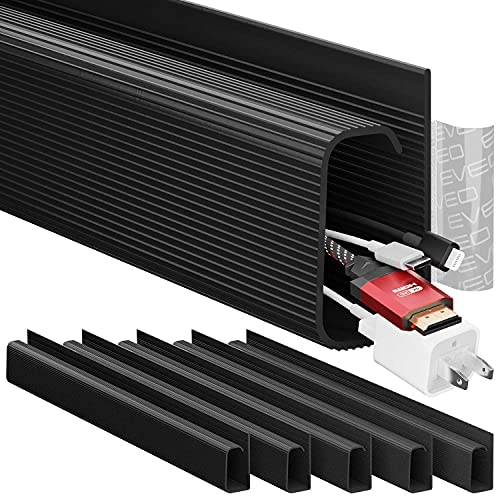
The EVEO kit focuses on transforming a cluttered workspace into a professional, tidy setup. The six raceways provide high-capacity cord management under the desk, with a strong adhesive system that enables tool-free installation. This makes it suitable for situations where drilling is not preferred or possible. The raceways are designed to accommodate multiple power cords and Ethernet cables, helping users maintain a clean surface area while protecting cables from dust and damage. The setup supports long-term organization, especially for workstations where cables are frequently added or re-routed.
Under Desk Cable Management Tray White, Cinati

This Cinati tray emphasizes no-drill mounting with clamp options and anti-scratch mats to protect the desktop surface. Its powder-coated metal construction offers durability, and the tray is designed to hold up to 10 pounds of cables and devices. The design supports inward or outward mounting to adapt to various desk layouts, giving users flexibility to route cables discreetly along the underside of the desk. Its generous interior dimensions and easy repositioning make it a practical choice for users who frequently reconfigure their desk setups or add new devices.
No-Screw Under Desk Cable Management Tray (Black, Set of 2)

This Scandinavian Hub option highlights adhesive-backed installation with a minimalistic appearance. The no-screw design makes it accessible for renters or those who want to avoid drilling. The set of two trays allows users to curate a staged under-desk cable layout with multiple channels or tiers. The product’s emphasis on improved desk aesthetics aligns with the goal of reducing visible clutter while preserving cable accessibility for quick reconfigurations.
Univivi No Drill Under Desk Cable Management Tray
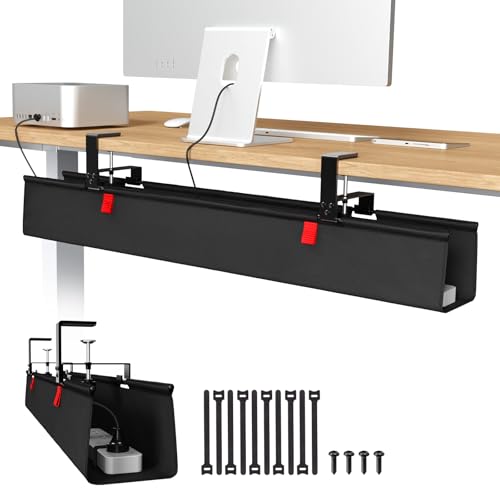
The Univivi tray offers a large capacity with flexible installation options, including no-drill clamp-on and screw-fix mounting. The 36-inch length and 5.5-inch width provide ample space for distributing power adapters, chargers, and several cables along the underside of the desk. The tray is designed to accommodate various tabletop materials, including wood, glass, and metal, making it suitable for different home and office environments. Built to simplify cable insertion and removal, its unfoldable design enables easier maintenance and adjustments as devices are added or removed from the workspace.
Buying Guide: Key Purchase Considerations
- Installation method: Choose between no-drill, clamp-on, or adhesive-backed options based on desk type, rental situations, and wall surface compatibility. Adhesive solutions require clean, smooth surfaces for strong bonding, while no-drill trays are ideal for quick setup and portability.
- Capacity and dimensions: Measure the number of cables, power adapters, and devices you plan to manage. Look for trays or channels with sufficient width, depth, and length to prevent overcrowding and overheating.
- Durability and material: Metal trays and flame-retardant sleeves offer long-term durability and safety. Durable plastics can be lighter and more flexible but may wear over time with heavy cables.
- Flexibility and modularity: Some options are expandable or come as sets, allowing you to add more segments as your workspace evolves. This is helpful in multi-device setups or future upgrades.
- Pet and child safety: If pets or kids interact with your desk area, prioritize products designed to prevent chewing and protect cords from damage.
- Aesthetic integration: Consider color, finish, and the overall look under your desk to ensure the solution blends with your office decor or home setup.
- Ventilation and heat management: Ensure that cable trays or channels do not obstruct airflow around power supplies and devices to avoid overheating.
- Maintenance: Look for easy-to-clean surfaces and simple removal or reorganization when devices change—this reduces maintenance time and keeps cables tidy over the long term.
By evaluating these factors, you can select a cord-management system that best fits your desk configuration, usage patterns, and safety needs. The combination of no-drill options and larger-capacity trays provides versatile choices for both minimalist setups and more complex, device-rich workstations.